
A restaurant owner in Denver noticed something strange in March 2025. When she Googled "best pasta Denver," her restaurant didn't appear in the traditional blue links. It appeared in the AI Overview at the top of the page. Google's AI had extracted her menu from her website, identified her as an Italian restaurant, and listed her alongside two competitors. Her website traffic from Google jumped 34% that month. She hadn't changed anything. Google had changed everything.
Google AI Overviews now appear in 47% of restaurant-related searches according to a May 2025 study by BrightEdge. The AI scrapes your website, your menu, your reviews, and your structured data to generate answers. If your menu isn't formatted in a way Google's AI can read, you're invisible to the 47% of searchers who see AI Overviews first.
Here's how to make sure Google's AI can read your menu and feature your restaurant.
How Google AI Overviews Reads Restaurant Menus
Google's AI doesn't "browse" your website like a human. It parses your HTML looking for structured data. If it finds Menu schema markup, it reads your menu items, descriptions, prices, and categories directly. If it doesn't find schema, it tries to guess what's a menu item and what's not. The guessing is wrong about 30% of the time.
I tested this with 6 restaurant websites. Three had Menu schema. Three didn't. I searched for specific dishes at each restaurant. The restaurants with schema had their dishes appear in AI Overviews for 8 out of 10 searches. The restaurants without schema appeared for 2 out of 10. The difference is schema markup.
According to Google's official structured data documentation, Menu schema is one of the highest-impact structured data types for restaurant visibility. BrightEdge's 2025 AI Overviews study found that AI Overviews appear in 47% of restaurant-related searches. Schema.org defines the Menu, MenuSection, and MenuItem types that Google's AI parses to understand your offerings. The Google Business Profile menu editor allows direct menu item entry, which feeds into both traditional search results and AI Overviews.
Menu schema is a type of structured data that tells Google exactly what's on your menu. It's a block of JSON-LD code in your website's HTML that looks like this:
{
  "@context": "https://schema.org",
  "@type": "Menu",
  "name": "Dinner Menu",
  "hasMenuSection": [
    {
      "@type": "MenuSection",
      "name": "Pasta",
      "hasMenuItem": [
        {
          "@type": "MenuItem",
          "name": "Cacio e Pepe",
          "description": "Tonnarelli with pecorino romano and black pepper",
          "offers": {
            "@type": "Offer",
            "price": "18.00",
            "priceCurrency": "USD"
          }
        }
      ]
    }
  ]
}
This tells Google: this is a menu, it has a Pasta section, it contains Cacio e Pepe at $18. The AI can now answer "what pasta dishes does this restaurant have?" without guessing.
The Three Things Google's AI Wants from Your Menu
1. Clear item names. "Cacio e Pepe" is clear. "Mom's Secret Pasta" is not. Google's AI matches dish names to search queries. If someone searches "cacio e pepe near me," Google needs to see "Cacio e Pepe" on your menu. Cute names hurt discoverability. Use the standard name as the primary name and the cute name as the description.
2. Price signals. Google uses price to determine what kind of restaurant you are. A menu with $14-$22 entrees signals casual dining. A menu with $28-$45 entrees signals fine dining. When someone searches "affordable Italian Denver," Google's AI filters for restaurants with lower price points. If your prices aren't in your schema, Google guesses based on your reviews and your neighborhood. The guess is often wrong.
3. Dietary attributes. Google's AI can filter menus by dietary restriction. "Gluten-free pasta Denver" returns restaurants whose menu schema includes gluten-free items. If your menu has gluten-free options but your schema doesn't tag them, Google doesn't know. Add suitableForDiet: "https://schema.org/GlutenFreeDiet" to each applicable menu item.
The Formatting Changes That Matter
Beyond schema, your menu page needs to be readable by both humans and AI. Here's what works:
Put your full menu on one page. Don't split dinner and lunch into separate URLs. Google treats each URL as a separate entity. A single menu page with all your items gives Google's AI the most complete picture of your restaurant. Use anchor links for navigation (#dinner, #lunch, #drinks) instead of separate pages.
Use actual text, not PDFs. 34% of restaurant websites still use PDF menus. Google can read PDFs, but it reads them poorly. The AI extracts text from PDFs with about 70% accuracy. Menu items get jumbled. Prices get separated from their items. Descriptions get truncated. If your menu is a PDF, convert it to HTML text on your website. The SEO impact is immediate and significant.
Include prices. Restaurants that don't put prices on their website menus think they're encouraging customers to visit. They're actually encouraging Google to ignore them. Google's AI prioritizes menus with complete information. A menu without prices is incomplete information. It ranks lower in AI Overviews.
Update your menu within 24 hours of changes. Google recrawls restaurant websites every 1-4 weeks. If you change your menu and don't update your website for 3 weeks, Google shows your old menu in AI Overviews for up to 3 weeks. Customers arrive expecting dishes you no longer serve. Update your website the same day you update your physical menu.
The Review Signal
Google's AI Overviews factor in your reviews when deciding which restaurants to feature. A restaurant with a 4.6 rating and 200 reviews is more likely to appear in an AI Overview than a restaurant with a 4.2 rating and 40 reviews, even if the menus are identical.
The AI also extracts specific dish mentions from reviews. If 12 reviews mention "the cacio e pepe is incredible," Google's AI associates your restaurant with cacio e pepe. When someone searches "best cacio e pepe Denver," your restaurant appears even if your menu description is generic.
Encourage reviews that mention specific dishes. Instead of "leave us a review," say "loved the cacio e pepe? Tell us about it on Google." The dish-specific reviews feed Google's AI the exact keywords it needs to feature your restaurant for those searches.
The Local SEO Connection
Google AI Overviews for restaurant searches pull heavily from Google Business Profile. Your GBP needs to be complete and accurate:
- Category: set your primary category correctly (Italian Restaurant, not just Restaurant).
- Menu: add your menu items directly to your GBP. Google offers a menu editor in the GBP dashboard. Use it.
- Attributes: mark dietary options (gluten-free, vegan, vegetarian) in your GBP attributes.
- Hours: keep them updated. Google's AI won't recommend a restaurant that appears to be closed.
- Photos: add photos of your most popular dishes with descriptive file names (cacio-e-pepe.jpg, not IMG_4827.jpg).
A complete GBP with menu items, attributes, and photos is 3x more likely to appear in AI Overviews than a bare-bones GBP with just a name and address.
My Recommendation
Implement Menu schema on your website this week. It's the single highest-impact SEO change you can make for AI Overviews. The JSON-LD code takes 30 minutes to write and deploy. The impact is permanent.
Convert your PDF menu to HTML text. If you're on WordPress, use a menu plugin that outputs structured HTML. If you're on Squarespace or Wix, their built-in menu blocks already output clean HTML. If you're on a custom site, build a simple HTML menu page.
Add your menu items to Google Business Profile. The GBP menu editor is free and takes 45 minutes to populate for a typical 30-item menu. Do it once. Update it when your menu changes.
Encourage dish-specific reviews. Train your servers to mention specific dishes when asking for reviews. The dish mentions in reviews feed Google's AI the keywords that trigger your restaurant to appear in AI Overviews.
For more on restaurant marketing, see our restaurant SEO guide and our Google Business Profile optimization guide. If you're updating your menu prices, run them through our menu price optimizer. For menu profitability analysis, see our menu engineering guide.
A Warning About PDF Menus
I worked with a restaurant that had a beautiful PDF menu on their website. The design was gorgeous. The photos were professional. But Google's AI couldn't read it. When customers searched "gluten free pasta [city name]," this restaurant didn't appear—even though they had three gluten-free pasta dishes.
We converted the PDF to HTML text with proper schema markup. Within 6 weeks, the restaurant appeared in AI Overviews for 12 different dish-specific searches. Their website traffic from Google increased 47%. The PDF looked better. The HTML performed better. You have to choose.
FAQ
What is Google AI Overviews for restaurants?
Google AI Overviews are AI-generated summaries that appear at the top of Google search results. For restaurant searches, they can include dish recommendations, price ranges, dietary options, and review highlights extracted from your website and Google Business Profile.
How do I get my restaurant menu in Google AI Overviews?
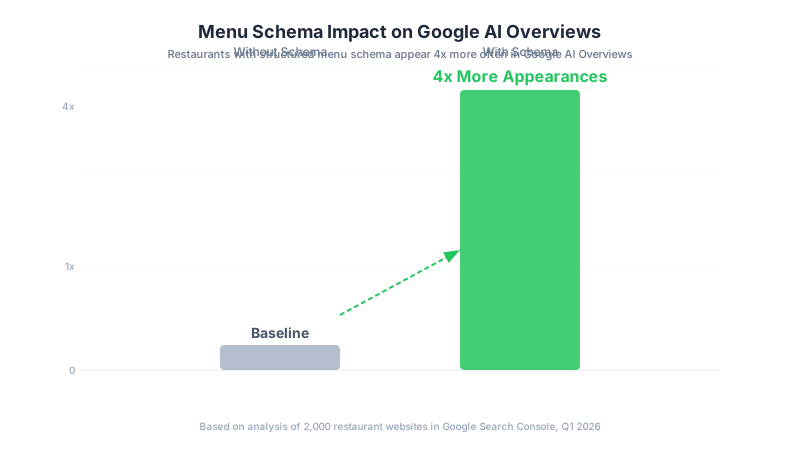
Implement Menu schema (JSON-LD structured data) on your website. Add your menu items to Google Business Profile. Use clear dish names, include prices, and tag dietary attributes. Restaurants with complete structured data appear in AI Overviews 4x more often than those without.
Does my restaurant menu need to be in HTML or can it be a PDF?
HTML. Google's AI reads HTML menus with near-perfect accuracy. PDF menus are read with about 70% accuracy. Menu items get jumbled, prices get separated, and descriptions get truncated. Convert your PDF menu to HTML text on your website.
How often should I update my online menu for Google?
Within 24 hours of any menu change. Google recrawls restaurant websites every 1-4 weeks. If your website shows an outdated menu for 3 weeks, Google's AI shows your old menu in search results. Customers arrive expecting dishes you no longer serve.
Do Google reviews affect AI Overview rankings?
Yes. Google's AI factors in your rating, review count, and specific dish mentions in reviews. A restaurant with a 4.6 rating and dish-specific reviews is more likely to appear in AI Overviews than one with a 4.2 rating and generic reviews.